

Introducing the Open Studios Raster to Vector Conversion Tool for WordPress
We are pleased to announce the launch of our first ever WordPress plugin! The Open Studios Raster to Vector Conversion Tool for WordPress lets you take any bitmap image files (jpg, png) and convert them to an SVG vector file with just one click. The result can then be saved to your WordPress media library.
Check out the video below where our Technical Director Paul Brzeski explains how it works.
How it works
The converter works directly inside the standard WordPress Media Library image editor, so there is no need to export an image, process it in another application and upload it again.
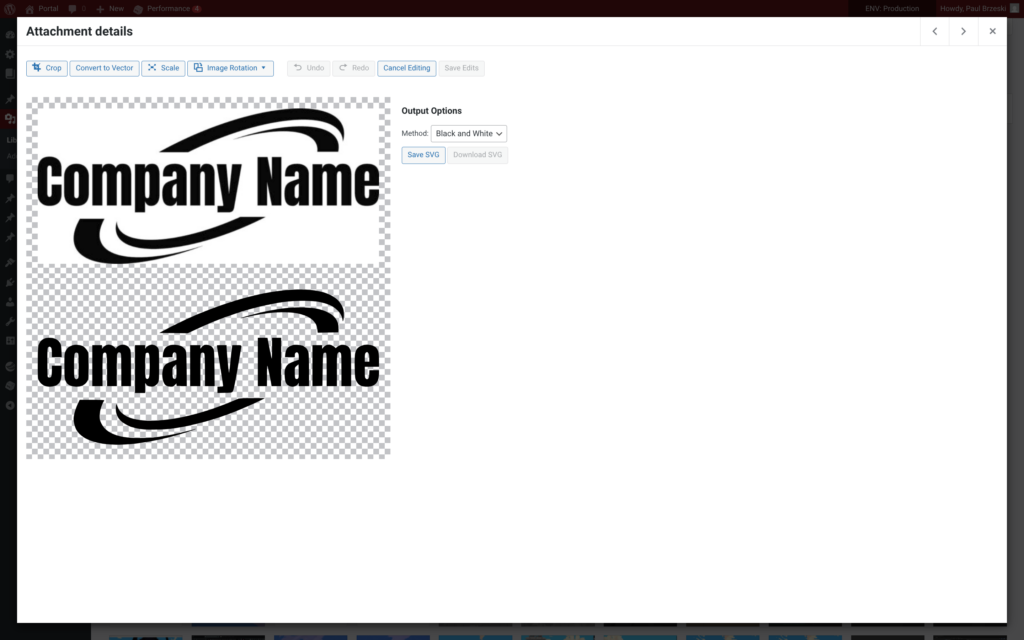
Open an image from your Media Library, click the Convert to Vector button (between Crop and Scale) and choose how you want the image traced. Once you are happy with the result, the generated SVG can be saved directly back into the WordPress Media Library.
Black & White
Uses Potrace to create clean, high-contrast vector paths. This mode works particularly well for line art, silhouettes, logos and other simple graphics.
Colour
Creates multi-colour vector artwork from raster images and is designed primarily for logos, icons and flat illustrations.
Converting an image
- Go to Media → Library in WordPress.
- Select the raster image you want to convert.
- Click Edit Image.
- Click Convert to Vector.
- Choose a black and white or colour conversion.
- Preview the result and click Save SVG to add it to your Media Library.
The converter works best with high-contrast images, logos, icons and flat artwork. Complex photographic images can produce less predictable results.
About the project
Years ago, we replaced Adobe Illustrator with Affinity Designer. The transition was pretty smooth, only a small amount of work was needed to clean up existing .ai files to work in the new software.
Then came the difference in features and capabilities. Make no mistake, Affinity Designer was a powerful tool that had also surpassed Illustrator in many ways. But it lacked a simple way to convert bitmap images into vectors, which was a key workflow we relied on in graphic design.
Inkscape offers pretty good conversion options, but it seemed counter intuitive to hop into a whole other slow to launch program for one function so we made our own tool called Manifold.
This plugin was derived from the tracing functionality within Manifold, which itself is based on the libraries Potrace and Imagetracer.js. The result is dubbed internally as “Project Euclid” which aims to provide the bitmap to raster functionality in a range of applications like Blender.
Project roadmap
We need to hook up the controls so users can fine tune and improve the colour tracing features including background removal on coloured graphics. Currently we can only remove backgounds on black and white.
Useful links
- Download the plugin from the official WordPress plugin directory
- Visit the project on Github
- Check out the original Manifold concept application
About Paul Brzeski
Paul Brzeski is the Co-Founder and Technical Director of Open Studios, and a writer and creative technologist with more than two decades of experience working with software, the web, systems and graphical applications.
His work spans web development, technical architecture, WordPress and PHP systems, DevOps, interactive 3D and experimental R&D. He writes about technology, software, creative practice and the systems people build and live within.
Outside of work, Paul is a house husband, writer and dog dad to three fur babies.
Read more: Paul’s blog · LinkedIn